Community
Create with Vibe Planner
Discover incredible projects built by our community. Get inspired and start planning your next big idea.
Want to See Your Project Here?
Start planning and building amazing projects with Vibe Planner today.
Get Started Free →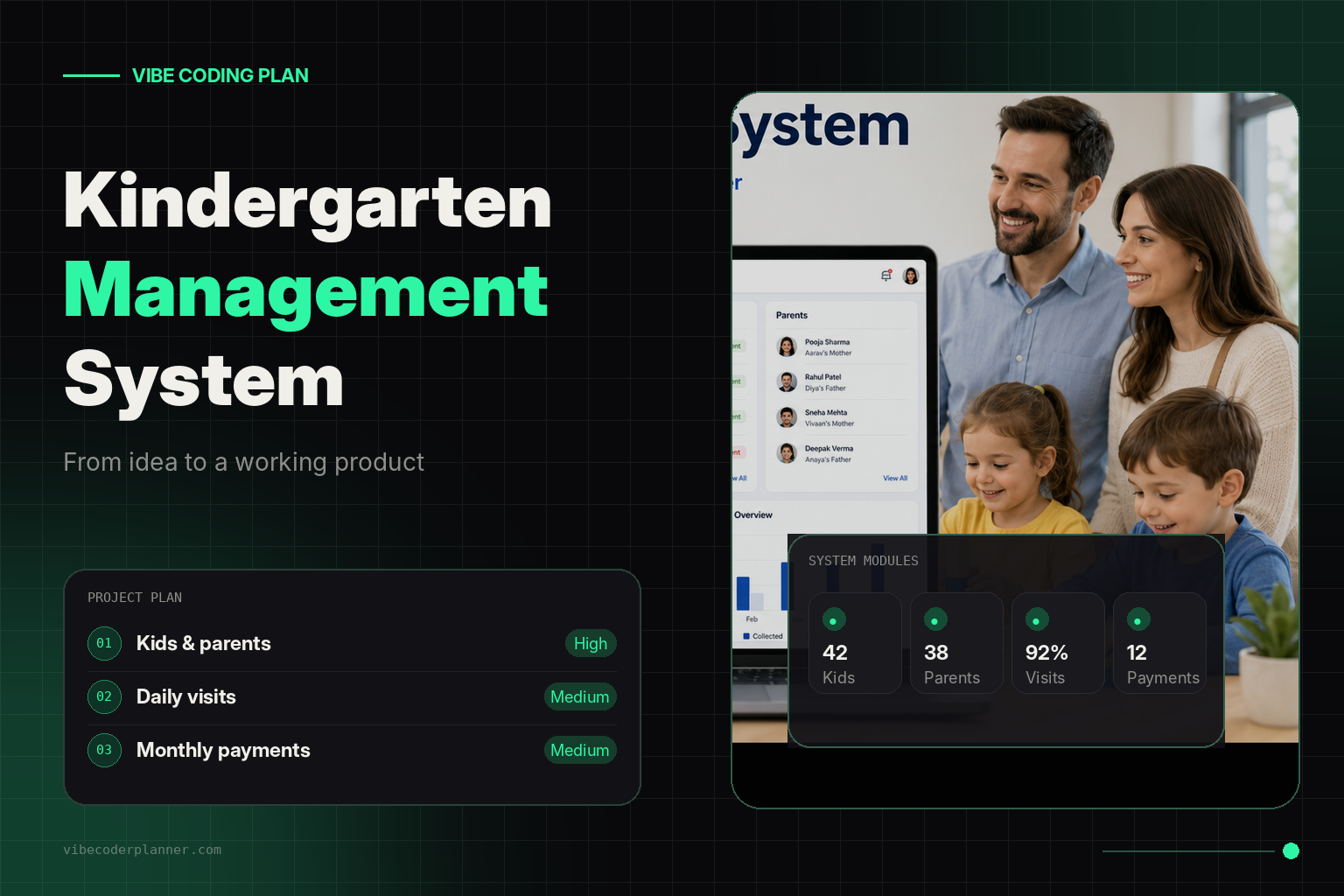
+2
From Paper Attendance Lists to a Complete Kindergarten Management System
From Paper Attendance Lists to a Complete Kindergarten Management SystemEvery morning at 8:00, the entrance of a small private kindergarten became crowded.Children arrived with parents, teachers answered questions, attendance was recorded on paper, and the manager tried to remember who had already paid the monthly fee.The system worked while the kindergarten had 15 children. After it grew to more than 40, small problems started appearing everywhere.A parent would ask whether their payment had been registered. A teacher would forget to mark an absent child. Contact information would be stored across notebooks, spreadsheets, messages and personal phones.The kindergarten did not need another spreadsheet. It needed a proper management system.Starting With the Real ProblemThe owner, Elena, contacted a developer with a simple request:We need a system for managing children, parents, monthly payments and daily attendance.This sounded like a small CRUD application. But several important questions appeared immediately.Could one child have two parents?Could a parent have more than one child?Would every family pay the same monthly fee?What happened when a child joined in the middle of the month?Should teachers mark every present child each morning?Who could view payment information?Instead of opening an AI coding assistant and asking it to “build a kindergarten system,” the developer first entered the idea into Vibe Coder Planner.Vibe Coder Planner converts a rough project description into structured development tasks. It classifies task complexity, creates focused prompts and recommends an appropriate AI model for each task. The platform also provides Kanban management, project context, GitHub integration and PRD export.The original project description was:Build a web-based kindergarten management system. The system must manage children, parents, attendance and monthly payments. Each child can have multiple parents or guardians. Monthly fees can be different for each family. Children should be considered present by default, and teachers should only mark children who are absent.That final requirement changed the entire attendance workflow.Designing Attendance Around the Real RoutineMost attendance systems begin with an empty list.A teacher must click every child who arrives.That approach creates unnecessary work. In this kindergarten, approximately 90 percent of the children attended on a normal day. Marking 36 present children was less efficient than marking four absent children.The new workflow was therefore reversed.At the beginning of each day, all active children were automatically marked as present. A teacher opened the attendance screen and unchecked only the children who were absent.The interface displayed:The current dateEvery active childA default “Present” statusAn option to mark the child as absentAn optional absence reasonThe teacher who updated the recordThe time of the last changeThis small product decision saved teachers time every morning and reduced missed attendance records.Turning the Idea Into Development TasksVibe Coder Planner separated the project into smaller tasks rather than creating one enormous prompt.The first milestone covered project architecture:Define user roles and permissions.Design the database structure.Create authentication.Build the parent and child relationships.Implement daily attendance generation.Add monthly fee management.Create reports and dashboard statistics.This structure was important because AI coding often becomes unreliable when the entire application is requested in a single conversation. Vibe Coder Planner scopes work into individual tasks and keeps project knowledge available through its context memory.Building the DatabaseThe system needed several connected records.ChildrenEach child profile contained:Full nameDate of birthGroupEnrollment dateStatusMedical or dietary notesEmergency informationAuthorized pickup contactsParents and GuardiansParent information was stored separately because the same parent could be connected to multiple children.Each profile included:Full namePhone numberEmail addressAddressRelationship to the childEmergency contact statusPermission to receive payment notificationsA connection table linked parents and children. This supported families with siblings, separated parents, grandparents and other guardians without duplicating contact information.Monthly FeesThe kindergarten did not use one fixed price for every family.Some children attended full-time. Others attended fewer days. Siblings received discounts, and several families had individually negotiated prices.For that reason, the monthly fee belonged to the child enrollment instead of being stored as one global system value.Each payment record contained:ChildBilling monthExpected amountAmount paidPayment datePayment methodPayment statusInternal notesWhen a new month began, the system generated payment records using each child’s configured monthly fee.The manager could then see unpaid, partially paid and completed payments without searching through bank statements or message history.Creating User RolesNot every staff member needed access to everything.The system introduced three main roles.Administrators could manage children, parents, groups, pricing, payments and reports.Teachers could view children in their groups, update attendance and access essential parent contact information.Accounting users could manage payments but could not edit attendance or sensitive child information.The permission rules became a separate high-complexity task because security and access control affect the entire application. Vibe Coder Planner is designed to recommend stronger models for architecture, security and complex logic while routing simpler CRUD and boilerplate work to lower-cost models.The Daily Attendance ProcessEvery night, the system created attendance records for the next working day.Each active child received the status:Present
When a teacher opened the dashboard in the morning, the list was already prepared.When a parent reported that a child was sick, the teacher changed the status to:Absent
The teacher could also select a reason:Sick
Family reasons
Vacation
Unknown
Other
If the child arrived later, the status could be changed back to present.This approach also made monthly reporting easier because every active child had a record for every working day.The Manager’s DashboardBefore the system was introduced, the manager needed several notebooks and spreadsheets to understand what was happening.The new dashboard showed everything in one place:Number of active childrenChildren present todayChildren absent todayExpected monthly revenueCollected paymentsOutstanding paymentsChildren without complete parent informationUpcoming birthdaysThe manager could open a child’s profile and see their parents, attendance history, monthly fee and payment records.When a parent called with a question, the answer was available immediately.Using AI Without Losing Project ControlThe developer used different AI models during implementation.Complex tasks such as database architecture, permissions and recurring attendance generation required stronger reasoning.Standard forms, validation, controllers and database migrations were more repetitive and could be generated with less expensive models.Tests and documentation could also be handled separately.Vibe Coder Planner supports this workflow by assigning complexity levels, recommending models, generating task-specific prompts and estimating the cost before execution. It also provides a Kanban workflow from backlog to completion.Instead of repeatedly explaining the entire project to an AI assistant, the developer worked through focused tasks such as:Create the database migrations and Laravel models for children, parents and guardians. A child can have multiple guardians, and a guardian can be connected to multiple children. Include relationship type, emergency contact status and pickup authorization in the pivot table.Another task focused only on attendance:Create a daily attendance service that generates a present record for every active child on working days. Prevent duplicate records. Allow teachers to change the status to absent and store the reason, user and update timestamp.Each prompt included only the context required for that feature.Managing Development Through KanbanThe project tasks were organized into four columns:Backlog
Ready
In Progress
Completed
The developer completed authentication and permissions before beginning the administrative screens.The database structure was finished before payment reports were created.Attendance generation was implemented before the teacher dashboard.This order prevented the AI from generating screens based on database structures that had not yet been finalized.The plan could also be exported as a PRD and connected with GitHub, allowing implementation work to remain connected to the original project requirements.The ResultAfter the system launched, the morning routine became much simpler.Teachers no longer marked every arriving child. They only updated exceptions.The manager no longer searched multiple files to check payments.Parent information was stored once and connected to the appropriate children.Every family could have its own monthly fee.Attendance and payment reports could be generated without manually combining spreadsheets.The biggest improvement was not a complicated AI feature.It was the decision to understand how the kindergarten actually operated before writing the code.What This Project DemonstratesA useful application does not begin with database tables or interface components.It begins with the daily actions of the people who will use it.In this project, the most important requirement was hidden inside one sentence:Do not make teachers mark every child as present. Mark everyone as present automatically and let teachers record only absences.Without structured planning, that detail could easily have been missed.Vibe Coder Planner helped transform a short idea into architecture, milestones and focused implementation tasks. Instead of asking AI to generate an entire application at once, the project was divided into manageable pieces that could be developed, tested and reviewed independently.That is the difference between generating code and building a system that works in the real world.
Martin Tonev
View Details
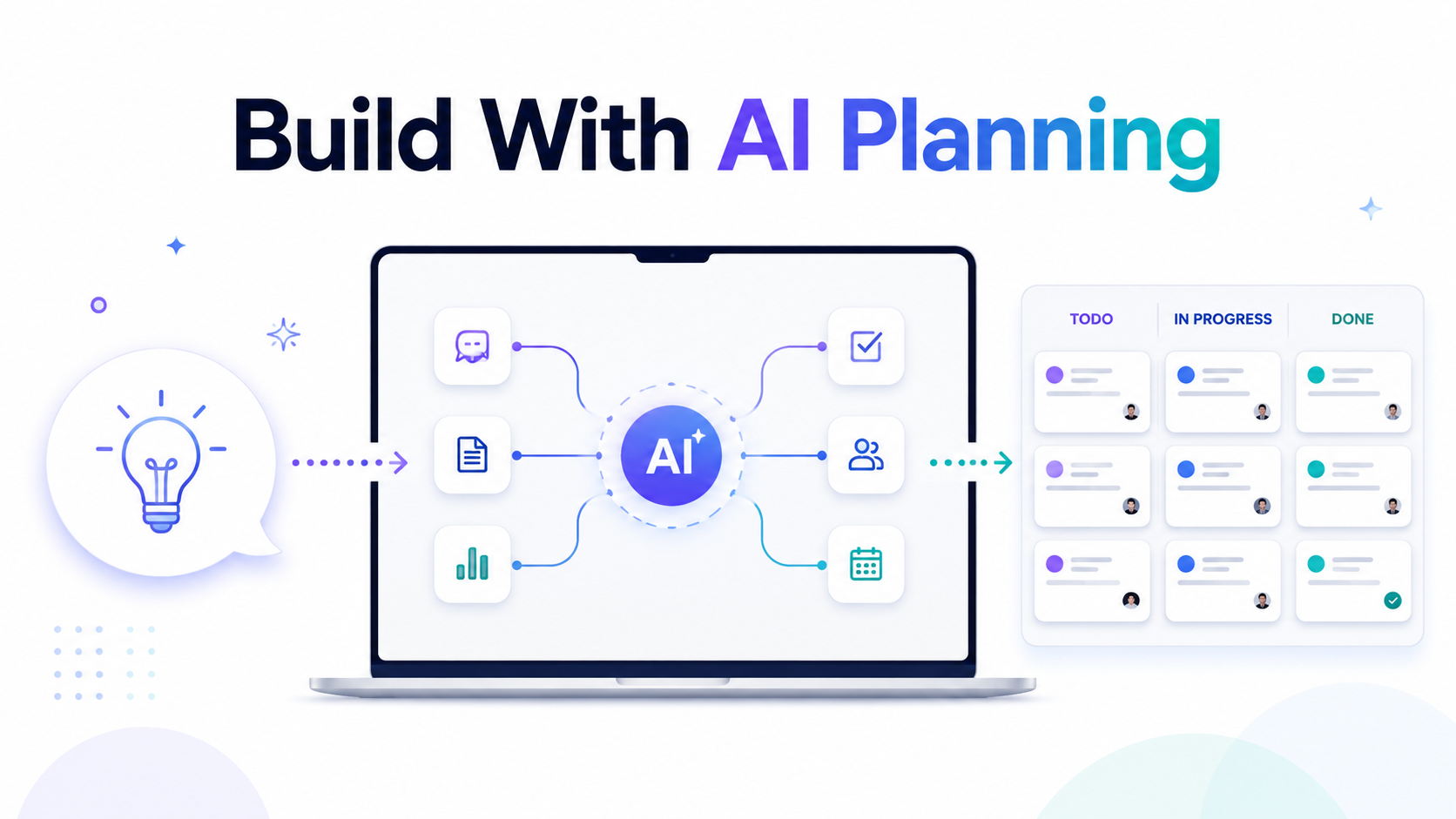
Build With AI Planning: How to Turn an Idea Into a Real Product Step by Step
Most people use AI coding tools in the wrong order.They open ChatGPT, Claude, Cursor, Copilot, or another AI coding assistant and immediately start asking for code. At first, this feels fast. The AI gives answers quickly. You get files, components, routes, controllers, database tables, and UI suggestions.But after a few hours, the project starts to become messy.The AI forgets earlier decisions. Features are built in the wrong order. Authentication changes break the dashboard. The database schema needs to be rewritten. Prompts become longer and more confusing. You spend more time fixing the AI output than building the product.That is the real problem with vibe coding.The problem is not AI. The problem is starting without a plan.AI planning fixes this by turning your idea into a structured execution roadmap before you start coding. Instead of asking AI to build everything at once, you break the project into clear tasks, classify the complexity, generate better prompts, and use the right AI model for each part of the job.This is exactly why Vibe Coder Planner exists.It gives builders, developers, indie hackers, SaaS founders, and agencies a better way to move from idea to working product.What Is AI Planning?AI planning is the process of using artificial intelligence to turn a rough product idea into a clear development plan.Instead of writing a long technical specification manually, you describe what you want to build in plain language. The AI then helps structure that idea into phases, features, tasks, priorities, and implementation steps.A good AI plan should answer questions like:What should be built first?Which features are required for the MVP?What database tables are needed?Which tasks are complex?Which tasks are simple?Which AI model should handle each task?What prompt should be used for each task?What can be built later?This is important because most failed AI coding sessions fail for one simple reason: the AI is given too much vague context and not enough structure.AI works much better when every task is small, specific, and connected to a clear goal.Why You Should Not Start With CodeStarting with code feels productive, but it often creates hidden problems.For example, imagine you want to build a SaaS app for appointment booking. You ask AI to create the app. It starts generating authentication, dashboard pages, booking forms, payment logic, emails, admin panels, and database migrations.The output looks impressive.But then you notice problems.The booking logic does not match your pricing model. The database does not support multiple team members. Stripe is added too early. Admin permissions are missing. Email notifications are hardcoded. The frontend and backend are not aligned.Now you have two choices.You either fix everything manually, or you ask AI to rewrite large parts of the project.Both options waste time.A better approach is to plan first.Before writing code, you should define the product structure, user roles, database logic, core features, integrations, and task order. Then each AI coding step becomes much easier.AI planning gives the AI less room to guess.Step 1: Start With a Clear Product IdeaThe first step is not writing a perfect technical brief. You only need a clear explanation of what you want to build.For example:“I want to build a SaaS app for small fitness studios. They should be able to manage clients, create workout plans, schedule sessions, accept payments, and track progress.”This is enough to start.You do not need to know every table, endpoint, or component yet. The job of AI planning is to help you discover those details.The important thing is to describe the product in real business language.Who is it for?What problem does it solve?What should users be able to do?What is the first useful version?This gives the AI a direction before it starts creating tasks.Step 2: Add Your Tech StackAfter the idea, define the stack.For example:Laravel backendVue or React frontendMySQL databaseStripe paymentsTailwind CSSGitHub repositoryThis matters because the same product can be planned differently depending on the technology.A Laravel SaaS app needs migrations, models, controllers, policies, queues, notifications, and maybe Filament or Nova for admin panels.A Next.js app needs routes, server actions, API handlers, authentication flows, and deployment logic.A Python AI app needs model handling, processing pipelines, API endpoints, storage, and background workers.When the planning tool knows your stack, the tasks become more accurate.Instead of generic advice, you get implementation steps that match how your project will actually be built.Step 3: Let AI Break the Project Into PhasesA good project plan is not just a list of features.It should be split into phases.For example:Phase 1: Project setup and architecturePhase 2: Authentication and user rolesPhase 3: Core database modelsPhase 4: Main product featuresPhase 5: Payments and subscriptionsPhase 6: Dashboard and UI polishPhase 7: Testing, deployment, and improvementsThis makes the build process much easier.You can see what needs to happen first. You can avoid building advanced features before the foundation is ready. You can also track progress clearly.This is especially useful when using AI agents or coding assistants because they perform better when each task has a clear place in the bigger plan.Step 4: Review the Plan Like a DeveloperAI planning does not mean you blindly accept everything.You should review the plan like a developer or technical lead.Look for missing logic.Are user roles clear?Is the database structure correct?Are payment rules defined?Are edge cases included?Are there tasks that should be merged?Are there tasks that are too large?Are some features not needed for the MVP?This step is important because the AI gives you a strong first structure, but your product knowledge still matters.The best workflow is not AI replacing your thinking.The best workflow is AI doing the heavy planning work, while you make the final product decisions.Step 5: Use the Right AI Model for the Right TaskNot every development task needs the most expensive AI model.Architecture, security, complex business logic, and difficult debugging may need a stronger model.But simple CRUD, config files, tests, seeders, basic UI components, and boilerplate tasks can often be handled by cheaper models.This is where smart model routing becomes useful.Instead of using one premium model for everything, each task can be matched with the model that makes the most sense.For example:Complex architecture task: use a stronger reasoning modelCRUD endpoints: use a cheaper coding modelUnit tests: use a fast low-cost modelUI copy or simple components: use a lighter modelSecurity-sensitive logic: use a stronger modelThis keeps quality high while reducing unnecessary AI spend.For developers and agencies using AI every day, this matters a lot. Small savings per task become large savings over a full project.Step 6: Generate Better Prompts for Each TaskBad prompts create bad code.A vague prompt like “build the dashboard” is too broad. The AI has to guess too much.A better task prompt should include:The exact feature to buildThe project stackThe files or areas involvedThe expected behaviorThe data structureValidation rulesEdge casesOutput requirementsA good AI planning workflow creates prompts at the task level.Instead of one huge prompt for the whole app, you get focused prompts for each piece of work.For example:“Create the Laravel migration, model, and relationships for client workout plans. Each workout plan belongs to a user and can have many exercises. Include fillable fields, relationships, and basic validation rules.”This is much better than:“Build workout plans.”Smaller prompts give better results.They also make debugging easier because every output is connected to one clear task.Step 7: Build Through a Kanban WorkflowOnce the plan is created, the work should not stay in a static document.It should become a real workflow.A Kanban board makes this simple.You can move tasks through stages like:BacklogIn ProgressReviewCompletedThis gives structure to AI development.Instead of jumping randomly between features, you work through the plan step by step.This is useful for solo builders, but even more useful for teams and agencies. Everyone can see what is planned, what is being built, and what is already finished.It also helps prevent one of the biggest problems in AI coding: endless rewriting.When every task has a place, you are less likely to ask AI to rebuild the same thing again and again.Step 8: Export the Plan as a PRDA Product Requirements Document is useful because it turns your idea into something shareable.You can use it with:ClientsDevelopersAI coding toolsProject managersInvestorsInternal teamsFreelancersA PRD gives everyone the same source of truth.It explains what the product is, what will be built, how it will be structured, and which tasks are required.For agencies, this is very powerful. You can show a client a structured plan before development starts. This reduces confusion, improves trust, and helps avoid scope creep.For solo founders, it gives clarity. You are no longer building from a messy idea. You are building from a real product plan.Why AI Planning Makes Vibe Coding BetterVibe coding is powerful because it lets you move fast.But speed without structure creates chaos.AI planning adds the missing structure.It helps you understand what to build before you build it. It creates better prompts. It keeps the AI focused. It helps you choose the right model. It saves tokens. It reduces rework. It turns a rough idea into a step-by-step execution system.This is the difference between randomly chatting with AI and actually building software with AI.One is guessing.The other is planning, executing, reviewing, and shipping.Who Should Use AI Planning?AI planning is useful for anyone building software with AI.It is especially useful for:Solo founders building MVPsDevelopers using Cursor, Claude, Copilot, or ChatGPTAgencies planning client projectsProduct managers creating technical specsStudents building final year projectsIndie hackers launching SaaS productsNon-technical founders working with AI toolsIf you already know how to code, AI planning makes you faster.If you are still learning, AI planning gives you a clearer path.If you work with clients, AI planning helps you explain the build before writing code.Final ThoughtsAI coding is not just about generating code faster.It is about building better products with less confusion.The best results come when you combine AI speed with developer structure.That means planning first, breaking the work into small tasks, using the right model for each task, generating focused prompts, and tracking everything through a real workflow.Vibe Coder Planner helps you do exactly that.You describe your idea. The AI turns it into a structured development plan. You review the tasks, use better prompts, route work to the right AI model, and move through the build step by step.That is how you stop wasting tokens.That is how you stop rebuilding the same features.That is how you turn vibe coding into a real development process.Start with a plan.Then build.
Martin Tonev
View Details
+3
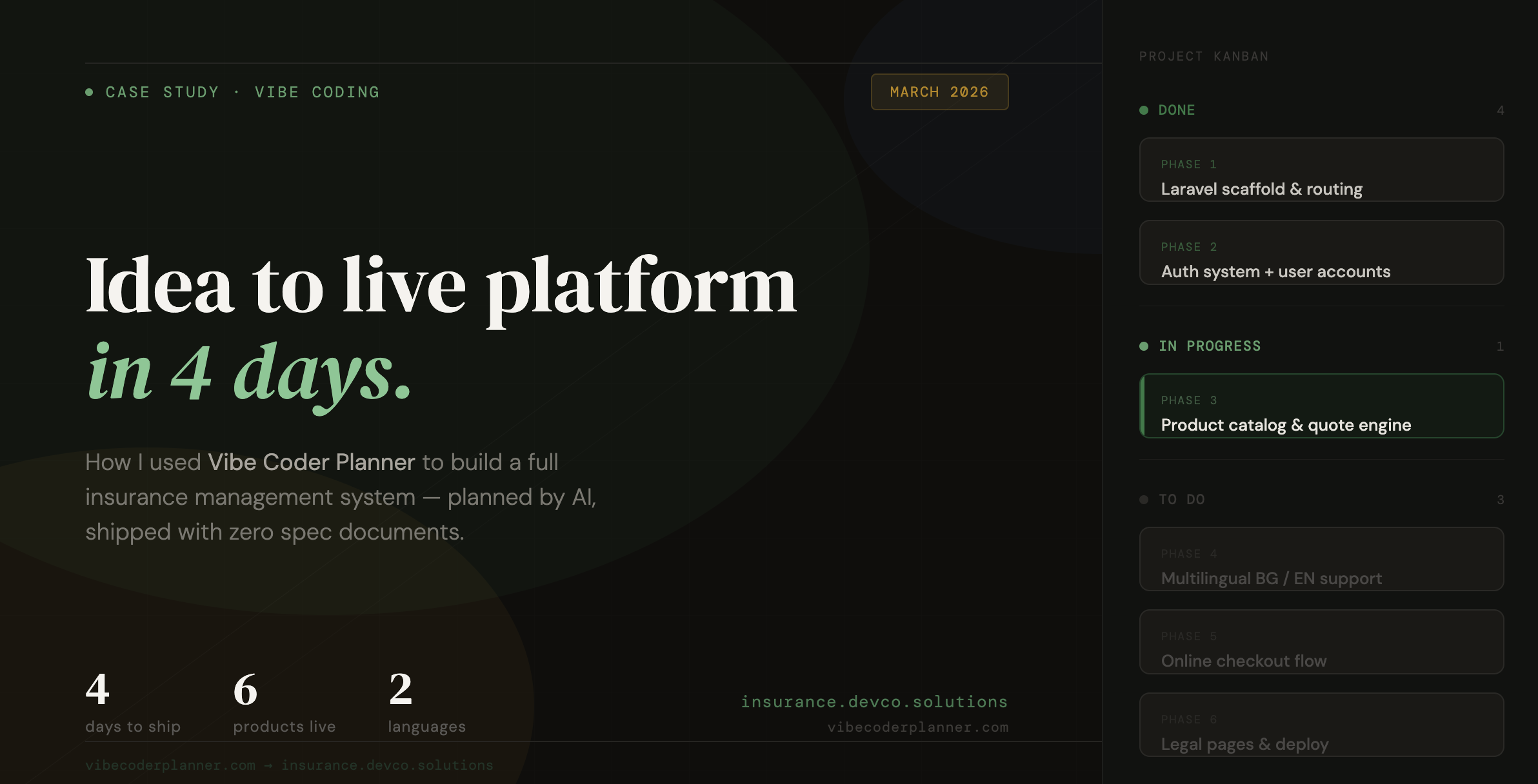
How I Used VibeCoderPlanner to Build an Insurance Management Project
Building software with AI sounds fast until the project becomes real.That is usually the moment when things start to break. The idea is clear in your head, but the execution gets messy. Features overlap, prompts become repetitive, architecture decisions get postponed, and before long you are asking the AI to rewrite the same logic for the third time.That is exactly the problem I wanted to solve with VibeCoderPlanner.VibeCoderPlanner is built around a simple idea. You describe what you want to build in plain language, it turns that into a structured development plan, breaks the work into scoped tasks, generates context-aware prompts for each task, and supports execution through AI tools with GitHub-based review and merge workflows. Publicly, the product presents this flow as: describe the idea, generate the plan, execute with AI tools, then review and ship. It also highlights Kanban planning, task prompts, AI execution, GitHub PR automation, context memory, exportable project docs, and support for 50+ tech stacks. (Vibe Planner)To show how this works in practice, I used it to build an Insurance Management Project, now available at insurance.devco.solutions. The live app already shows the core customer-facing flow clearly: visitors can browse insurance products, request a quote, and complete the purchase online. The homepage also exposes multilingual support, authentication, product categories, and a three-step user journey built around product selection, instant quote generation, and online purchase. (insurance.devco.solutions)Why this project was a good testInsurance software is not a toy project.Even when you start from the public-facing side only, it already has enough complexity to expose whether your planning workflow is solid or not. You are not just building a marketing website. You are building a system that needs product structure, quote logic, pricing presentation, authentication, multilingual content, clean navigation, and a reliable user flow that feels trustworthy.On the public insurance site, that complexity already shows up in practical ways. There are multiple insurance product types, including car insurance, casco, property insurance, health insurance, and travel insurance, each with its own pricing and positioning. The site also supports Bulgarian and English language switching, customer login and registration, and a homepage optimized around trust, speed, and simple conversion. (insurance.devco.solutions)This is exactly the kind of project where random prompting starts to fail.Without structure, an AI assistant can build isolated pages, but not a coherent system. One prompt gives you a landing page. Another gives you authentication. A third gives you quote forms. But none of that guarantees the project is moving in the right order or that the codebase stays consistent.That is where VibeCoderPlanner changed the workflow.Step 1: Turning the raw idea into a buildable planInstead of starting with ad hoc prompts inside a chat window, I started the way VibeCoderPlanner is designed to be used: by describing the project idea in plain language.The value here is not just that it “understands” the request. The real value is that it transforms the request into a structured roadmap. VibeCoderPlanner publicly describes this as generating phases, tasks, milestones, tech stack recommendations, time estimates, and a context-aware prompt for every task. (Vibe Planner)For the insurance project, that meant I could define the product at a system level first.Not “build me a homepage”.But something closer to:Build an insurance management platform with multilingual support, customer authentication, insurance product listings, quote request flow, pricing display, secure online purchase flow, informational pages, and a scalable structure for adding more insurance products later.That one shift matters a lot.Because once the project is translated into phases and tasks, you are no longer asking AI to invent the roadmap while coding. The roadmap already exists. AI becomes an executor inside a system, not a substitute for system thinking.Step 2: Breaking the project into execution-friendly phasesOne of the biggest problems in AI-assisted development is context overload. VibeCoderPlanner explicitly addresses this problem by framing tasks so they fit cleanly into an AI context window and by giving each task its own scoped prompt and place in the workflow. (Vibe Planner)For an insurance platform, that matters immediately.A project like this should never be built as one giant “create the entire app” instruction. It needs separation of concerns.Using VibeCoderPlanner, the project can be naturally broken into implementation phases such as:application scaffold and routingmultilingual layout and public navigationinsurance product catalogquote request flowauthentication and customer dashboardpurchase and policy delivery flowadmin and product managementrefinement, testing, and deploymentThat is the difference between chaotic AI coding and controlled AI-assisted shipping.Instead of huge prompts with too many moving parts, each task becomes small enough to execute well and review properly.Step 3: Generating prompts that are actually usefulMost AI development workflows fail at the prompt layer.Either the prompts are too vague, or they are so large that the model loses focus. VibeCoderPlanner solves this by generating prompts task by task, based on the phase and the project context. It specifically positions itself as producing “smart AI prompts” and context-aware prompts for each development task. (Vibe Planner)That was especially useful in the insurance project because every feature had product-specific constraints.A quote form is not just a form.A multilingual product page is not just a content page.A login flow on an insurance platform is not just auth.Each feature has domain expectations. The prompts needed to reflect that. For example, product listing tasks had to preserve trust and clarity. Pricing tasks had to present amounts cleanly. Quote tasks had to move the user forward without friction. Language switching had to feel native, not patched in later.This is where VibeCoderPlanner gave me an advantage. It kept the prompts tied to the project structure rather than letting them drift into one-off experiments.Step 4: Managing the work like a real project, not a chat sessionAnother important part of the process was the Kanban workflow.VibeCoderPlanner publicly includes a Kanban task board that lets you organize work from backlog to completion. That matters more than people think. AI coding only becomes reliable when you can see what has been planned, what is in progress, what has been executed, and what still needs review. (Vibe Planner)For the insurance project, that meant I was not relying on memory or old chat messages to know what came next.The board becomes the source of truth.That changes the psychology of the build. You stop feeling like you are improvising. You start moving through the project intentionally.For a system with public product pages, quote interactions, authentication, and future back-office expansion, that kind of visibility is essential.Step 5: Executing tasks with AI while keeping controlThis is the part most people care about.VibeCoderPlanner is not just positioned as a planning tool. It also supports AI task execution. Publicly, it states that a task can be executed so the AI agent writes code, creates files, shows terminal output, commits to the repository, and opens GitHub pull requests for review. It also names support for tools such as Claude Code, GitHub Copilot, DeepSeek, and Kimi AI, alongside GitHub integration and PR automation. (Vibe Planner)That is the right model for serious AI-assisted development.I do not want “magic full autonomy”.I want a system where planning is structured, execution is fast, and review stays under my control.That model fits an insurance project perfectly. In a domain where trust matters, you do not want blind code generation landing directly in production. You want the AI to move quickly, but you still want a review and merge layer before changes are accepted.That is the workflow VibeCoderPlanner is built around: AI helps produce and execute work, but the final responsibility still belongs to the builder. (Vibe Planner)Step 6: Keeping project memory across tasksA hidden problem in AI coding is that every prompt can become a reset.You solve one feature, move to the next, and suddenly the assistant forgets the architecture, the naming conventions, the business rules, or the UI direction.VibeCoderPlanner publicly includes Context Memory as one of its product features. That is a big deal for a project like this, because consistency matters everywhere: product naming, language handling, page structure, route organization, form behavior, and user flow expectations. (Vibe Planner)When building the insurance platform, this kind of memory is what helps preserve continuity between tasks.It means the quote flow does not feel like it was built by a different “team” than the product catalog. It means the authentication flow can align better with the rest of the application. It means the prompts do not need to keep re-explaining the same project from scratch.That reduces prompt bloat and improves output quality.What the live insurance project provesThe public insurance app already demonstrates that this was not just a theoretical planning exercise.The live site presents a clear conversion path. Users can review available insurance categories, see starting prices, switch languages, authenticate, request quotes, and move toward purchase. The homepage messaging emphasizes speed, ease, and security, while the product catalog is organized into practical categories such as auto, property, health, and travel insurance. (insurance.devco.solutions)That matters because it shows the result of the process.Not just “AI generated some tasks”.Not just “I used prompts”.But a real project with a visible structure and a real user journey.What I learned from using VibeCoderPlanner on this buildThe biggest lesson is simple.AI development becomes dramatically more useful when planning is treated as a product layer, not an afterthought.Most people try to use AI as a replacement for project thinking. That is why they end up with inconsistent code, duplicated effort, and features that technically work but do not belong to a coherent system.VibeCoderPlanner approaches the problem differently. Its public product positioning is very clear: break the idea into tasks, generate prompts, execute with AI tools, and ship through a structured workflow with review and GitHub integration. (Vibe Planner)That approach worked well for the insurance project because the project needed more than code generation. It needed ordering, context, controlled execution, and a way to move from concept to shipped product without losing the architecture halfway through.Final thoughtsThe promise of AI coding is not that you can skip thinking.The real promise is that once the thinking is structured correctly, execution becomes much faster.That is what I used VibeCoderPlanner for.I did not use it as a toy prompt generator. I used it as the operating layer between idea and implementation. It helped turn the Insurance Management Project from a broad concept into a phased build, into scoped execution, and into a live product with a real customer-facing flow.If you are building anything more serious than a landing page, that difference matters.Because the hard part is rarely getting AI to write code.The hard part is getting AI to build the right thing, in the right order, with enough continuity that the final product still feels like one system.That is exactly where VibeCoderPlanner helped.
Martin Tonev
View Details
+2
Fake Watch Detect with AI
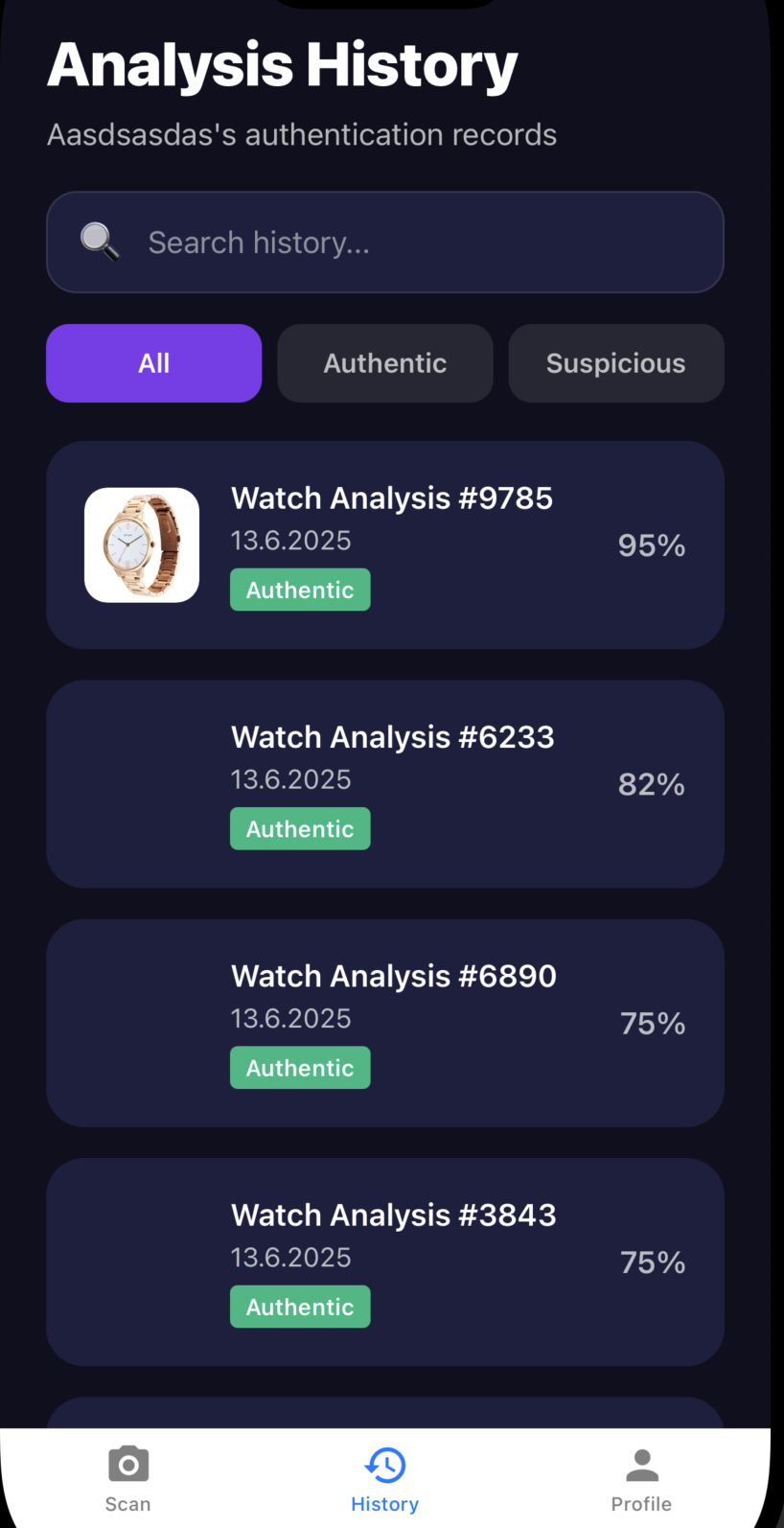
A few months ago, I started experimenting with the idea of AI-powered authenticity detection. I’ve always been fascinated by luxury watches and even more by how well-made fakes have become. On marketplaces and reselling platforms, you can easily find “super clones” that are nearly impossible to tell apart from the originals, even for trained eyes.That problem became the seed for an idea:What if we could train AI to detect fake watches from photos automatically and at scale?From Idea to MVP Built With AI AutomationInstead of building everything from scratch, I used VibePlanner.devco.solutions, a SaaS I’ve been developing to help people go from idea to working AI product without writing a single line of code.I entered my concept:“An app that detects fake luxury watches using AI.”Vibe Planner instantly generated: https://vibeplanner.devco.solutions/Project structure (landing page, admin panel, upload form, and results view)OpenAI + YOLOv11 pipeline for image analysisDatabase schema for storing image metadata and prediction resultsStripe integration for monetizationWithin a day, I had a full MVP ready to test.The Model YOLOv11 + Vision EmbeddingsThe detection model combines:YOLOv11 object detection for identifying specific watch regions (logos, bezels, dials, crowns)CLIP-based embeddings to match these features against a dataset of verified authentic watchesConfidence scoring that gives users a clear “Authentic / Possibly Fake” result with explanation snippetsIt’s simple to use:Upload a photo of your watch.The AI analyzes design details, engravings, and proportions.Within seconds, you get a visual report and confidence score.Real Revenue Why It’s Already ProfitableThe first users came from Reddit watch communities and collector forums where I offered early access to test the app. I added a $5 pay-per-scan option through Stripe for detailed reports.In just the first month, over 180 paid scans came in organically with no ads and no marketing spend. Collectors loved that they could check watches before buying from resellers.Today, “Fake Watch Detect” brings in a steady 400 to 500 USD per month in profit, fully automated. The traffic is organic, and the infrastructure costs are minimal because the pipeline runs only when an image is uploaded.What Makes It WorkNiche problem with high perceived value: people are willing to pay to avoid losing thousands on a fake.Instant utility: no signups, no learning curve, just upload, analyze, and get results.AI-driven credibility: the report includes visual evidence and detection overlays.Scalable foundation: built once on Vibe Planner, easily replicated for other markets such as sneakers, handbags, or art.The Bigger Picture“Fake Watch Detect” started as a weekend experiment but became a proof of concept that AI micro-products can be profitable when built around real pain points.It also showed how tools like Vibe Planner remove 90% of the friction between idea and execution.Instead of spending weeks coding, I could focus entirely on the dataset, the model quality, and user experience.Closing ThoughtAI is no longer just about big platforms or complex enterprise tools.It’s about solving very specific, high-trust problems and doing it fast.“Fake Watch Detect” is just one example of what’s possible when you combine niche insight with the right AI infrastructure.And the best part, it pays for itself every single day.
Martin Tonev
View Details
/